Science & techIssue OLED touchscreen MacBook Pro: release date, price and what's new?
Q. What is the Dynamic Island, and what does it do on iPhone and Mac?
Apple’s new MacBook Pro, announced on 28 October, is the first Mac with a touchscreen, and it borrows something from the iPhone: the Dynamic Island. If you use an older iPhone with a notch, or no iPhone at all, the name may not mean much. So what exactly is the Dynamic Island, and what will it do on a Mac?
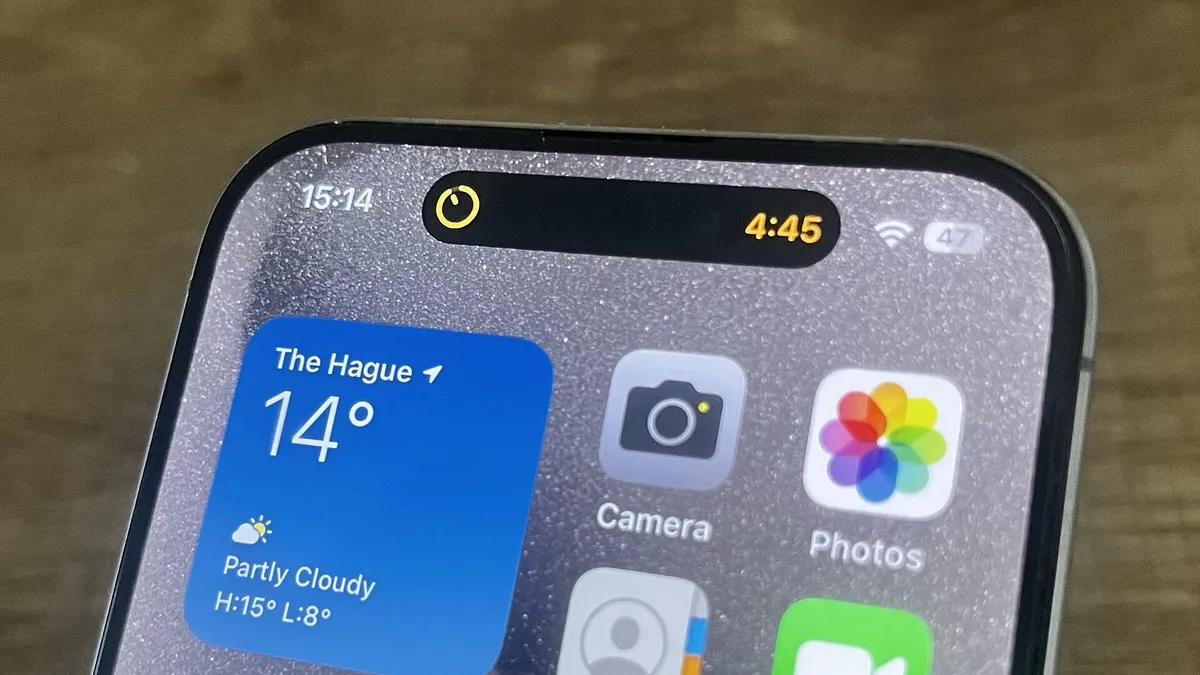
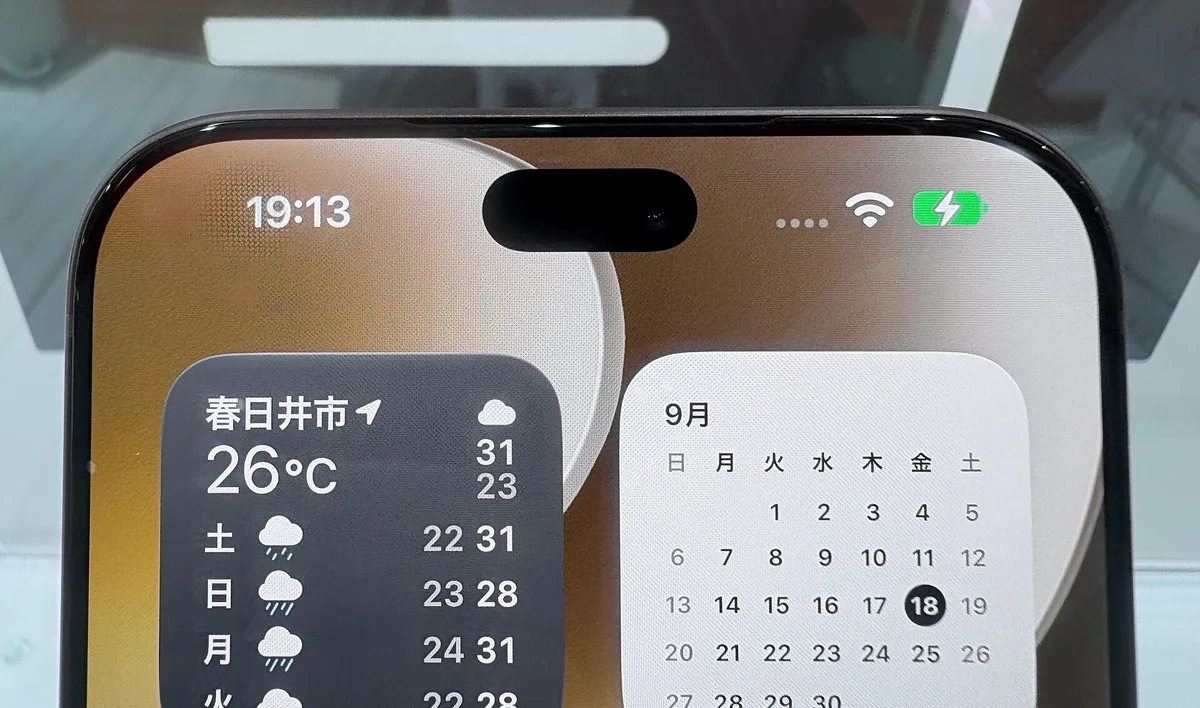
The short answer: the Dynamic Island is the black area around the iPhone’s front camera that software stretches and shrinks to show alerts and tasks in progress. It arrived with the iPhone 14 Pro in September 2022 and replaced the notch. On the new MacBook Pro, Apple calls it the home for Spotlight search, Live Activities and Siri AI (artificial intelligence).

Why is it called the Dynamic Island?
Apple’s announcement doesn’t explain the name, but the two words fit: an island of black near the top of the screen that keeps changing shape. It replaced the notch, the black cutout that first appeared on the iPhone X in 2017 and held the front camera and sensors.
For the iPhone 14 Pro, Apple redesigned the TrueDepth camera, its bundle of front camera and Face ID sensors, to take up less of the display, and turned the space around it into a window for alerts and activities. Apple called it a design that blends the line between hardware and software. Its guidelines for app developers add that Live Activities in the Dynamic Island sit on a black background and wrap tightly around the camera.
What does the Dynamic Island show?
Two kinds of things. Some are brief alerts, such as Face ID checking your face. Others are Live Activities: updates an app keeps showing on the Lock Screen and in the Dynamic Island while a task is under way. When your iPhone is unlocked, you see them on the Home Screen or on top of whatever app you’re using.
| When you… | The Dynamic Island shows |
|---|---|
| Get directions in Maps | Your directions |
| Play music | What’s playing; touch and hold for playback controls |
| Set a timer | The time remaining |
| Record a voice memo | That a recording is in progress |
| Use AirDrop | The AirDrop connection |
| Authenticate with Face ID | Face ID at work |
| Use a delivery, ride-share or sports app | Order status, ride details or live scores (if the app supports it) |
Third-party apps can join in as long as they support Live Activities; when Apple introduced the feature in 2022, it named sports scores and ride-sharing as examples. When a task ends, its Live Activity leaves the Dynamic Island right away.
How do you use the Dynamic Island?
Apple’s current iPhone User Guide, written for iOS 27, lists a handful of gestures:
- Touch and hold an activity to expand it and see more detail, plus controls such as music playback where the app offers them.
- Swipe the expanded activity up to collapse it again.
- Tap the activity you want to view to switch between two activities.
- Swipe across to move between activities on iPhone 18 Pro models, which can show up to three at once.
Apple’s design guidelines add that tapping a single Live Activity opens its app at the related details, which is handy for jumping back into Maps mid-route. Gestures vary by version: the iOS 26 guide also lists swiping from the center toward one side to expand an activity, and back toward the center to collapse it.
Can you turn off the Dynamic Island?
Apple’s iPhone User Guide offers no setting to switch off the Dynamic Island itself; instead, it explains how to change Live Activity settings app by app. Its center is where the front camera physically sits, so no display setting could hide it anyway.
In iOS 27, go to Settings > Apps, choose the app, then tap Live Activities. Apple notes that not every app has this setting. To clear an activity that is on screen right now, finish the task: when a timer ends or a route is complete, it disappears. An expanded activity shrinks back when you swipe it up.
Which iPhones have the Dynamic Island?
It started on the two iPhone 14 Pro models and reached the standard models a year later with the iPhone 15. Apple’s Identify your iPhone model page (checked on 30 October 2026) lists it on these models:
| Year | With the Dynamic Island | Without |
|---|---|---|
| 2022 | iPhone 14 Pro, 14 Pro Max | iPhone 14, 14 Plus, SE (3rd generation) |
| 2023 | iPhone 15, 15 Plus, 15 Pro, 15 Pro Max | – |
| 2024 | iPhone 16, 16 Plus, 16 Pro, 16 Pro Max | – |
| 2025 | iPhone 17, iPhone Air, 17 Pro, 17 Pro Max | iPhone 16e |
| 2026 | iPhone 18 Pro, 18 Pro Max, iPhone Duo | iPhone 17e |
Apple describes the iPhone 18 Pro models as having a “smaller” Dynamic Island. On iPhone Duo, Apple’s first foldable, both the outer and the inner display have one, and the user guide places it on the right edge rather than at the top.
What will the Dynamic Island do on the Mac?
Back to the news. According to MacRumors, the new MacBook Pro drops the notch at the top of its display in favor of a small Dynamic Island that takes up less space. Apple calls the Mac’s Dynamic Island the new home for Spotlight, Live Activities and Siri AI. Spotlight searches everything on the Mac, and Siri AI is Apple’s more capable, conversational assistant.
Apple’s examples: search the Mac, ask a question, pick up a phone call or control music, all from the Dynamic Island. Because the display now responds to touch, you can also accept an AirDrop request or pause a song with a tap of your finger.
Apple’s footnotes add two caveats. Spotlight moves into the Dynamic Island only if Siri AI is available and turned on, and Siri AI comes as a beta in macOS 27.2, in English, French, Japanese, Korean, Portuguese and Spanish. Details such as the island’s exact size, or whether you can hide it, aren’t in the announcement, so look for them in Apple’s user guides once the MacBook Pro goes on sale on 6 November.
In short
The Dynamic Island is the black area around the iPhone’s front camera that stretches and shrinks to show alerts and Live Activities; it replaced the notch on the iPhone 14 Pro in 2022. There’s no setting to switch it off, but you can manage Live Activities app by app. On the new MacBook Pro, it becomes the home for Spotlight, Live Activities and Siri AI.
More from this issue
 OLED touchscreen MacBook Pro: release date, price and what's new?
 What is tandem OLED, and how is it different from regular OLED and mini-LED?
 What is OLED burn-in, what causes it, and how do you prevent it?
 What is refresh rate, and can you see the difference between 60Hz and 120Hz?
 What is contrast ratio, and what does 10,000,000:1 really mean?
People also ask
Can you turn off the Dynamic Island?
Apple's iPhone User Guide offers no setting to switch off the Dynamic Island itself, and its center is where the front camera physically sits. What you can change is each app's Live Activities: in iOS 27, go to Settings > Apps, choose the app, then tap Live Activities. Not all apps have this setting.
Which iPhones have the Dynamic Island?
According to Apple's model guide: iPhone 14 Pro and 14 Pro Max; iPhone 15, 15 Plus, 15 Pro and 15 Pro Max; iPhone 16, 16 Plus, 16 Pro and 16 Pro Max; iPhone 17, iPhone Air, 17 Pro and 17 Pro Max; iPhone 18 Pro and 18 Pro Max; and iPhone Duo. iPhone 14, 14 Plus, 16e, 17e and older models don't have it.
What are Live Activities?
Live Activities keep an app's ongoing task, such as Maps directions, a live sports score or a food delivery order, updating on your Lock Screen and in the Dynamic Island. iPhones without a Dynamic Island show them on the Lock Screen.
Sources
- Apple Newsroom - Apple debuts iPhone 14 Pro and iPhone 14 Pro Max (7 Sep 2022)
- Apple Support - View Live Activities in the Dynamic Island on iPhone
- Apple Support - Access features from the iPhone Lock Screen
- Apple Support - Identify your iPhone model
- Apple Developer - Human Interface Guidelines: Live Activities
- Apple Newsroom - Apple unveils groundbreaking MacBook Pro with PROLED XDR Display and Touch for the first time on Mac (28 Oct 2026)
- Engadget - The iPhone 14 Pro ditches the notch for a giant hole in the screen (7 Sep 2022)
- MacRumors - Apple Announces OLED MacBook Pro With Touch Display (28 Oct 2026)