Science & techIssue French supermarket fridges hacked to 50°C: what exactly happened?
Q. What is firmware, and what happens if you don't update it?
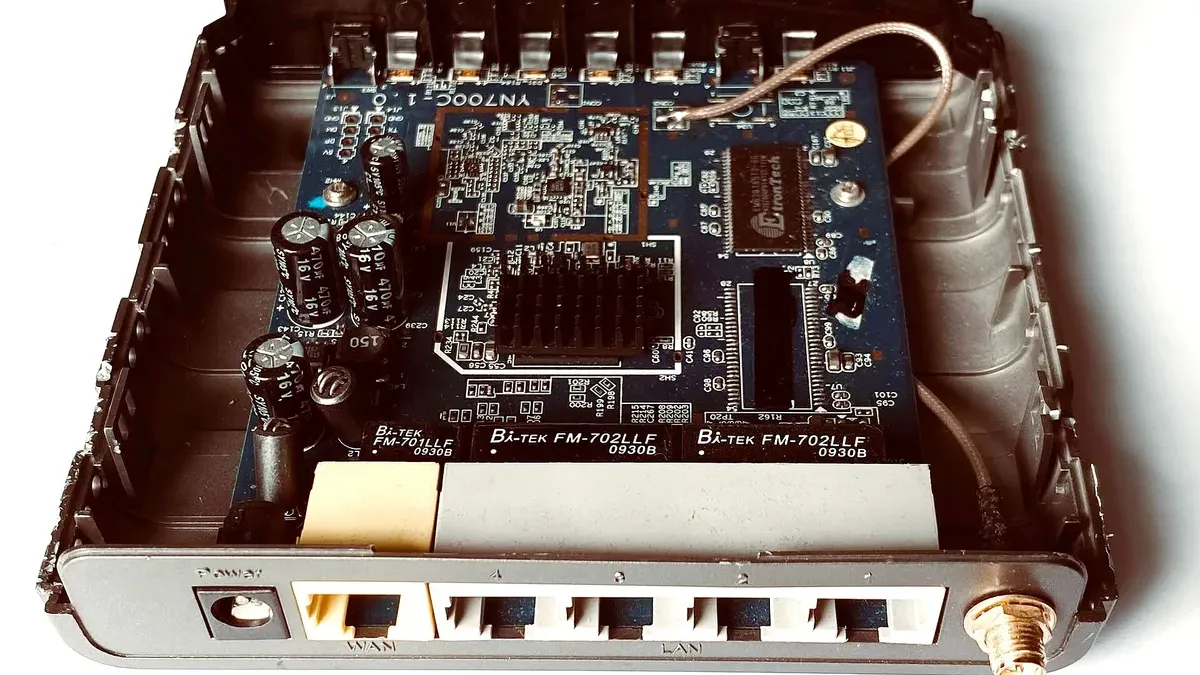
When the French supermarket fridge hack pushed store fridges and freezers up to 50°C (122°F), one detail stood out: the hijacked equipment had been running “outdated firmware”. Anyone who has tapped “Remind me later” on an update prompt may have winced. So what is firmware, exactly, and what happens if you don’t update it?
The short answer: firmware is the built-in program on a chip inside a device that directly runs its hardware, and if you put off updating it, security holes that are already public stay open. Skipping an update will not break your device. But on something always online, such as a router or an IP (Internet Protocol) camera (a camera that streams video over the internet), those holes can let attackers in.

What is firmware, exactly?
The US National Institute of Standards and Technology (NIST) defines firmware as programs and data stored in hardware, typically in read-only memory (ROM), so that they cannot be changed while they run.
Think of a washing machine. Press “Normal” and it fills, washes and spins in a fixed order. The program that drives the motor and valves through that sequence is firmware. Every device in the figure has it, and so do many parts inside your phone.
Fun fact: “firm” is usually explained as the middle ground between hard and soft, and Merriam-Webster dates the word to 1967.
Firmware vs software: what is the difference?
Firmware is a kind of software. The difference is where it lives and who changes it: you install and delete apps yourself, but firmware sits on the chip of one specific part and changes only when the manufacturer releases an update.
An operating system (OS) such as Windows or Android manages the whole device and runs your apps. When you switch on a PC, firmware called BIOS (basic input/output system) or UEFI (Unified Extensible Firmware Interface) wakes up before Windows, checks the hardware and loads the operating system. The line is not always sharp, though: many smart TVs list firmware updates under “Software Update” in their menus.
| Hardware | Firmware | Software (OS and apps) | |
|---|---|---|---|
| In a word | The physical parts | The program that runs the parts | Programs that run on top |
| Where it lives | Boards, chips, motors | Memory chips in the part (ROM, flash) | Storage (SSD, phone storage) |
| How it changes | Replace the part | Occasional maker updates | Installed by you; updated often |
| Examples | Router box, fridge compressor | Router’s built-in system, BIOS/UEFI | Windows, Android, messaging apps |
What does a firmware update actually change?
A firmware update replaces a device’s built-in program with a newer version from the manufacturer. That is possible because many modern devices keep firmware in flash memory (memory that can be erased and rewritten electrically). An update may fix bugs or add features, but what matters most is the security patch, which closes a vulnerability (a weak spot in the code that attackers can use). Vulnerabilities often turn up after a product ships, and your device stays exposed until the fix is installed on it.
What happens if you don’t update firmware?
Not every device carries the same risk. An offline microwave with old firmware gives outsiders almost no way in. The concern is devices that are always on a network.
A published fix also tells the world the hole exists. The US Cybersecurity and Infrastructure Security Agency (CISA) warns that attackers may keep targeting a vulnerability for months or even years after an update is available. CISA’s Known Exploited Vulnerabilities (KEV) catalog, which lists only flaws used in real attacks, held more than 1,700 entries in October 2026.
In the French case, Danfoss, the Danish company that supplied the refrigeration-control software, said the affected units were running outdated firmware and that it had long advised customers to update. France’s cyber agency ANSSI (Agence nationale de la sécurité des systèmes d’information) and the Paris prosecutor are still investigating, though, so it is too early to say an update alone would have stopped the attack.
Still, putting off an update means living with a hole that is already public. End-of-life (EOL) products, which no longer get updates, are riskier still because new holes will never be closed, so CISA recommends retiring them. The UK’s National Cyber Security Centre (NCSC) suggests checking a device’s support period before you buy and treating it like a “use by” date. Since 29 April 2024, UK law has also required smart devices sold there to meet basic security rules.
Is it safe to update firmware, and how do you check your version?
Yes, as long as the update comes from the right place and you let it finish. To check your version, look under “About” or “Device information” in the settings menu. On a router, it is usually on the admin page (the settings page you open in a web browser). Versions are usually dotted numbers, and higher means newer, so compare yours with the latest one on the maker’s website.

The biggest risk is losing power. If the update is cut off while the chip is being rewritten, the device can, at worst, become a “brick” that will not turn on at all. Router maker TP-Link, for one, warns users not to switch off the router or unplug its cable during an upgrade. Once an update starts, leave the power and cables alone until it finishes.
Only get updates from the device menu, the maker’s app or its official website. CISA warns not to trust emails with links or attachments claiming to be updates, because attackers have used them to spread malware disguised as updates.
Easiest of all, turn on automatic updates, as both CISA and the NCSC recommend. Add the NCSC’s other basics, changing any default password and switching off remote access you do not need, and you have covered the essentials.
In short
Firmware is the built-in program on a device’s chip that directly runs its hardware. Skipping an update will not stop the device working, but on anything connected to the internet it leaves known holes open. Get updates through official channels and keep the power on until they finish.
More from this issue
 French supermarket fridges hacked to 50°C: what exactly happened?
 Celsius vs Fahrenheit: what is 50 degrees Celsius in Fahrenheit?
 What temperature should a fridge be? And the freezer?
 What is the cold chain, and why throw away food after a power outage?
 Can smart home devices be hacked, and how do you secure them?
 Can AI hack? How far have AI cyberattacks really come?
People also ask
What happens if you don't update firmware?
Usually nothing breaks right away, and the device keeps working. But holes the manufacturer has already fixed stay open on your device, and on anything connected to the internet, such as a router or an IP camera, attackers can use them. Turn on automatic updates if the device offers them, or check the maker's website now and then.
What is the difference between firmware and software?
Firmware is a kind of software. What sets it apart is that it sits on a chip inside a specific device and directly runs that hardware, you do not install or delete it yourself, and it changes only when the manufacturer releases an update. Apps and operating systems run on top of it.
Is it safe to update firmware?
Yes, if you get the update from the device menu, the maker's app or its official website and let it finish. The main risk is losing power partway through, which can leave the device unable to start. If that happens, contact the manufacturer's support rather than trying to fix it yourself.